Introduction
In today’s digital world, cyber threats have become more sophisticated and dangerous than ever before. Among the many forms of cybercrime, ransomware stands out as one of the most damaging and costly attacks affecting individuals, businesses, schools, hospitals, and government organizations. Every year, ransomware attacks cause billions of dollars in financial losses, disrupt critical services, and expose sensitive information to cybercriminals.
Ransomware attacks have become increasingly common because they can be highly profitable for attackers. A single successful attack can lock victims out of their files, systems, or networks, forcing them to choose between paying a ransom or potentially losing valuable data forever. Understanding what ransomware is, how it works, and how to prevent it is essential for anyone who uses computers, smartphones, or the internet. This guide explains everything you need to know about ransomware and provides practical steps to protect yourself from becoming a victim.
What Is Ransomware?
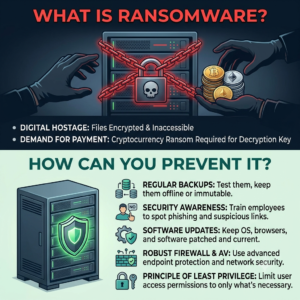
Ransomware is a type of malicious software (malware) designed to block access to a computer system, network, or files until a ransom is paid. Once the ransomware infects a device, it typically encrypts important files, making them inaccessible to the victim. The attacker then demands payment, often in cryptocurrency, in exchange for a decryption key that can restore access to the data.
The term “ransomware” comes from the word “ransom” because cybercriminals essentially hold digital information hostage. Victims receive a message informing them that their files have been encrypted and providing instructions on how to pay the ransom. In some cases, attackers threaten to publish stolen data if payment is not made within a specified timeframe.
Ransomware attacks can affect anyone, from individual users and small businesses to large multinational corporations. The impact often includes financial losses, operational downtime, reputational damage, and legal consequences.
How Ransomware Works
Ransomware attacks typically follow a series of steps that allow cybercriminals to gain access, encrypt files, and demand payment.
Step 1: Initial Infection
The attack usually begins when a victim unknowingly downloads malicious software. This can happen through phishing emails, infected attachments, malicious websites, fake software updates, or compromised downloads.
Step 2: System Penetration
Once the malware is installed, it silently gains access to the system. Some ransomware variants attempt to spread across networks and infect multiple devices before activating.
Step 3: File Encryption
The ransomware scans the system for valuable files, including documents, images, videos, databases, and backups. It then encrypts these files using advanced encryption algorithms.
Step 4: Ransom Demand
After encryption is complete, a ransom note appears on the screen. The message typically explains what happened, how much money must be paid, and the deadline for payment.
Step 5: Data Recovery or Loss
Victims face a difficult decision. Paying the ransom does not guarantee file recovery, while refusing to pay may result in permanent data loss if backups are unavailable.
Common Types of Ransomware
Cybercriminals use different types of ransomware to achieve their goals.
Crypto Ransomware
This is the most common form of ransomware. It encrypts files and demands payment in exchange for a decryption key.
Locker Ransomware
Locker ransomware locks users out of their devices entirely, preventing access to the operating system and applications.
Double Extortion Ransomware
In addition to encrypting files, attackers steal sensitive data and threaten to release it publicly if the ransom is not paid.
Ransomware-as-a-Service (RaaS)
Ransomware-as-a-Service allows cybercriminals to rent ransomware tools from developers, making attacks easier to launch and increasing their frequency.
How Ransomware Spreads
Understanding how ransomware spreads is crucial for prevention.
Phishing Emails
Phishing remains the most common delivery method. Attackers send emails that appear legitimate and encourage users to click links or open attachments containing malware.
Malicious Downloads
Downloading software, games, movies, or files from untrusted sources can expose devices to ransomware infections.
Software Vulnerabilities
Outdated software often contains security weaknesses that attackers can exploit to gain unauthorized access.
Remote Desktop Protocol (RDP) Attacks
Cybercriminals frequently target poorly secured remote access systems to infiltrate networks and deploy ransomware.
Infected Websites
Visiting compromised websites can result in automatic malware downloads through exploit kits or malicious advertisements.
Signs of a Ransomware Infection
Early detection can help minimize damage.
Common warning signs include:
- Files suddenly becoming inaccessible
- Unusual file extensions appearing
- Significant system slowdown
- Missing or renamed files
- Unexpected pop-up messages
- Disabled security software
- Appearance of ransom notes
Recognizing these symptoms quickly can help users isolate infected devices and prevent further spread.
Why Ransomware Is So Dangerous
Ransomware is considered one of the most dangerous cyber threats because of its ability to disrupt operations and cause significant financial damage.
For businesses, ransomware can halt production, disable critical systems, and prevent employees from accessing essential data. Hospitals may lose access to patient records, schools may experience disruptions to learning platforms, and government agencies may face service interruptions.
Individuals can lose personal documents, photos, financial records, and important memories. Even if a ransom is paid, there is no guarantee that attackers will provide a working decryption key or delete stolen information.
The combination of financial loss, operational disruption, and data exposure makes ransomware particularly devastating.
How to Prevent Ransomware Attacks
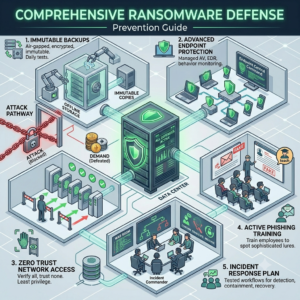
Prevention is the most effective defense against ransomware.
1. Keep Software Updated
Software updates often include security patches that fix vulnerabilities exploited by attackers.
Always update:
- Operating systems
- Web browsers
- Antivirus software
- Applications
- Network devices
Enabling automatic updates helps maintain strong security.
2. Use Reliable Antivirus Software
Modern antivirus solutions can detect and block ransomware before it causes damage.
Choose reputable security software that offers:
- Real-time protection
- Ransomware detection
- Threat monitoring
- Automatic updates
Regular system scans help identify suspicious files early.
3. Create Regular Backups
Backups are one of the most important defenses against ransomware.
Follow the 3-2-1 backup strategy:
- Keep 3 copies of your data
- Store them on 2 different media types
- Keep 1 copy offsite or offline
If files are encrypted, backups allow recovery without paying a ransom.
4. Be Cautious with Emails
Never open unexpected email attachments or click suspicious links.
Before interacting with emails:
- Verify the sender
- Check for spelling errors
- Confirm requests independently
- Avoid downloading unknown attachments
Awareness significantly reduces phishing risks.
5. Use Strong Passwords
Weak passwords make systems vulnerable to unauthorized access.
Best practices include:
- Using long, complex passwords
- Avoiding password reuse
- Using a password manager
- Updating passwords regularly
Strong authentication reduces attack opportunities.
6. Enable Multi-Factor Authentication (MFA)
MFA requires additional verification beyond a password.
Examples include:
- Mobile authentication apps
- SMS codes
- Security keys
Even if attackers obtain a password, MFA helps prevent account compromise.
7. Restrict User Privileges
Users should only have access to the resources necessary for their roles.
Limiting administrative privileges reduces the ability of ransomware to spread throughout systems and networks.
8. Train Employees and Users
Human error remains one of the leading causes of ransomware infections.
Cybersecurity training should cover:
- Phishing awareness
- Safe browsing habits
- Password security
- Incident reporting
Educated users are less likely to fall victim to attacks.
What to Do If You Are Infected
If ransomware infects your device:
Immediately Disconnect
Disconnect the infected device from:
- Internet connections
- Wi-Fi networks
- External storage devices
- Shared network resources
This helps prevent further spread.
Report the Incident
Organizations should notify:
- IT departments
- Cybersecurity teams
- Relevant authorities
Individuals may also report attacks to local cybercrime agencies.
Do Not Immediately Pay
Paying the ransom does not guarantee recovery.
Instead:
- Assess available backups
- Consult cybersecurity professionals
- Explore decryption tools
- Investigate recovery options
Many victims successfully recover without paying attackers.
Future of Ransomware
Ransomware continues to evolve as cybercriminals develop more sophisticated techniques. Artificial Intelligence, automation, and advanced social engineering methods are making attacks more targeted and effective.
At the same time, cybersecurity technologies are improving. AI-powered threat detection, zero-trust security frameworks, and advanced endpoint protection solutions are helping organizations defend against ransomware more effectively.
The ongoing battle between attackers and defenders means cybersecurity awareness will remain critical for years to come.
Conclusion
Ransomware is one of the most serious cybersecurity threats facing individuals and organizations today. By encrypting files and demanding payment, attackers can cause significant financial losses, operational disruptions, and emotional stress. Understanding how ransomware works is the first step toward effective protection.
The best defense against ransomware is prevention. Keeping software updated, using antivirus protection, creating regular backups, enabling multi-factor authentication, and practicing safe online habits can significantly reduce the risk of infection. While ransomware attacks may continue to evolve, proactive cybersecurity measures can help ensure your data remains secure and accessible.
Frequently Asked Questions (FAQs)
1. What is ransomware?
Ransomware is a type of malware that encrypts files or locks systems and demands payment for restoration.
2. How do ransomware attacks start?
Most attacks begin through phishing emails, malicious downloads, software vulnerabilities, or compromised websites.
3. Should I pay a ransomware ransom?
Cybersecurity experts generally advise against paying because there is no guarantee of data recovery.
4. Can antivirus software stop ransomware?
Modern antivirus software can detect and block many ransomware threats, but no solution offers 100% protection.
5. What is the best way to recover from ransomware?
Maintaining secure and up-to-date backups is the most reliable way to recover data without paying attackers.