Introduction
Cloud computing has become one of the most important technologies driving the modern digital world. From streaming movies and storing photos to running large business applications and artificial intelligence systems, cloud computing powers a huge part of today’s internet. In 2026, almost every organization—from startups to global enterprises—relies on cloud services in some form.
Instead of storing data or running software on a local computer, cloud computing allows users to access computing resources over the internet. These resources include servers, storage, databases, networking, and software applications. This shift has completely changed how businesses operate, making technology more scalable, flexible, and cost-efficient.
Understanding cloud computing is essential for students, IT professionals, business owners, and anyone interested in modern technology. This article explains what cloud computing is, how it works, its benefits, and the challenges it brings.
What Is Cloud Computing?
Cloud computing refers to the delivery of computing services over the internet, often called “the cloud.” These services include storage, processing power, databases, software, and analytics tools.
Instead of owning physical hardware or installing software on a personal device, users can access these resources remotely through cloud providers such as Amazon Web Services (AWS), Microsoft Azure, and Google Cloud.
In simple terms, cloud computing means renting computing power and services instead of buying and maintaining your own infrastructure.
How Cloud Computing Works
Cloud computing works through a network of remote servers hosted in data centers around the world. These servers store data, run applications, and process information for users.
When a user accesses a cloud-based application, their request is sent over the internet to a cloud server. The server processes the request and sends back the result almost instantly.
Cloud computing is typically divided into three main service models:
1. Infrastructure as a Service (IaaS)
IaaS provides virtualized computing resources such as servers, storage, and networking. Users can build and manage their own systems without owning physical hardware.
2. Platform as a Service (PaaS)
PaaS offers a development environment for building applications. Developers can focus on coding while the platform handles infrastructure management.
3. Software as a Service (SaaS)
SaaS delivers software applications over the internet. Users can access applications through browsers without installation, such as email services, document editors, and CRM systems.
Types of Cloud Deployment
Cloud computing is also categorized based on deployment models.
Public Cloud
Public cloud services are offered over the internet and shared among multiple users. They are managed by third-party providers and are highly scalable.
Private Cloud
A private cloud is dedicated to a single organization. It offers more control, security, and customization but requires higher costs.
Hybrid Cloud
A hybrid cloud combines public and private clouds, allowing organizations to balance flexibility and security.
Benefits of Cloud Computing
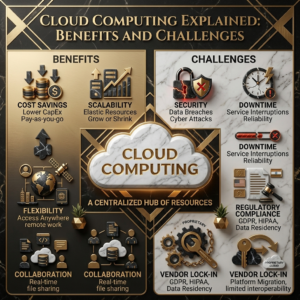
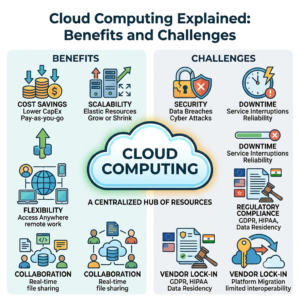
Cloud computing offers numerous advantages that have made it the backbone of modern digital infrastructure.
1. Cost Efficiency
One of the biggest benefits of cloud computing is cost savings. Businesses do not need to invest in expensive hardware or maintain data centers. They only pay for the resources they use, making it highly cost-effective.
2. Scalability and Flexibility
Cloud services can easily scale up or down based on demand. Whether a business experiences sudden traffic spikes or seasonal changes, cloud systems can adjust resources instantly.
3. Accessibility
Cloud computing allows users to access data and applications from anywhere in the world as long as they have an internet connection. This supports remote work and global collaboration.
4. Disaster Recovery
Cloud providers offer backup and recovery solutions that protect data from loss due to hardware failure, cyberattacks, or natural disasters.
5. Automatic Updates
Cloud platforms handle software updates and maintenance automatically, ensuring users always have access to the latest features and security patches.
6. Improved Collaboration
Teams can work together in real time on shared documents, projects, and applications. This improves productivity and communication.
7. High Performance
Cloud providers use advanced infrastructure and high-speed networks to ensure fast processing and reliable performance.
Challenges of Cloud Computing
Despite its many benefits, cloud computing also comes with certain challenges and risks.
1. Security and Privacy Concerns
Storing data on remote servers raises concerns about data privacy and security. Unauthorized access, data breaches, and cyberattacks are potential risks.
2. Internet Dependency
Cloud services require a stable internet connection. Without internet access, users may not be able to access critical data or applications.
3. Downtime Risks
Although rare, cloud service outages can disrupt business operations and affect millions of users simultaneously.
4. Limited Control
Since infrastructure is managed by third-party providers, users have limited control over the underlying systems and configurations.
5. Cost Management Issues
While cloud computing is cost-effective, improper usage or lack of monitoring can lead to unexpected expenses.
6. Data Migration Complexity
Moving large amounts of data from on-premises systems to the cloud can be complex and time-consuming.
Real-World Applications of Cloud Computing
Cloud computing is used in almost every industry today.
Healthcare
Hospitals use cloud systems to store patient records, manage appointments, and enable telemedicine services.
Education
Schools and universities use cloud platforms for online learning, digital classrooms, and student collaboration.
Business and Finance
Companies use cloud computing for accounting, data analytics, customer management, and enterprise applications.
Entertainment
Streaming platforms like video and music services rely heavily on cloud infrastructure to deliver content globally.
Artificial Intelligence
AI systems depend on cloud computing for processing large datasets and training machine learning models.
Popular Cloud Providers
Several major companies dominate the cloud computing industry:
Amazon Web Services (AWS)
Amazon Web Services is the leading cloud platform offering a wide range of services including computing, storage, and AI tools.
Microsoft Azure
Microsoft Azure provides enterprise-grade cloud solutions and integrates well with Microsoft products.
Google Cloud Platform
Google Cloud focuses on data analytics, AI, and scalable infrastructure.
IBM Cloud
IBM Cloud offers hybrid cloud solutions and enterprise services.
Future of Cloud Computing
The future of cloud computing is closely tied to emerging technologies such as artificial intelligence, edge computing, and 5G networks. As demand for real-time processing increases, cloud systems will become faster, more intelligent, and more decentralized.
Edge computing will bring data processing closer to users, reducing latency. AI integration will make cloud systems smarter and more automated. Businesses will increasingly adopt multi-cloud strategies to improve reliability and flexibility.
Cloud computing will continue to be a foundation for digital transformation across industries.
Conclusion
Cloud computing has revolutionized the way data is stored, processed, and accessed. It offers powerful benefits such as cost savings, scalability, accessibility, and improved collaboration. However, it also comes with challenges like security concerns, internet dependency, and limited control.
Despite these challenges, cloud computing remains one of the most important technologies of the modern era. As it continues to evolve, it will play a critical role in shaping the future of business, education, healthcare, and technology innovation.
Frequently Asked Questions (FAQs)
1. What is cloud computing in simple words?
Cloud computing is the delivery of computing services like storage and software over the internet instead of using local devices.
2. Is cloud computing safe?
Yes, but it depends on the provider and security practices. Most major providers use advanced security systems.
3. What are examples of cloud services?
Examples include Google Drive, Dropbox, Microsoft 365, and Amazon Web Services.
4. Why do companies use cloud computing?
Companies use cloud computing for cost savings, scalability, data storage, and improved collaboration.
5. What are the main types of cloud computing?
The main types are public cloud, private cloud, and hybrid cloud.